How DNS Resolution Works
What is DNS and why name resolution exists?
DNS stands for Domain Name System. The job of DNS is to provide the IP address for the domain names. It can be understood as phonebook, just as phonebook contains the phone number of peoples, similarly DNS contains the IP address for the the domain names.
Humans can easily remember names but not phone numbers, that’s why we have phonebook and similarly humans cannot easily remember the IP address for different websites. Therefore we have a domain name against IPs, and when we want the visit that IP, DNS helps us to provide the IP of that domain to web browser.
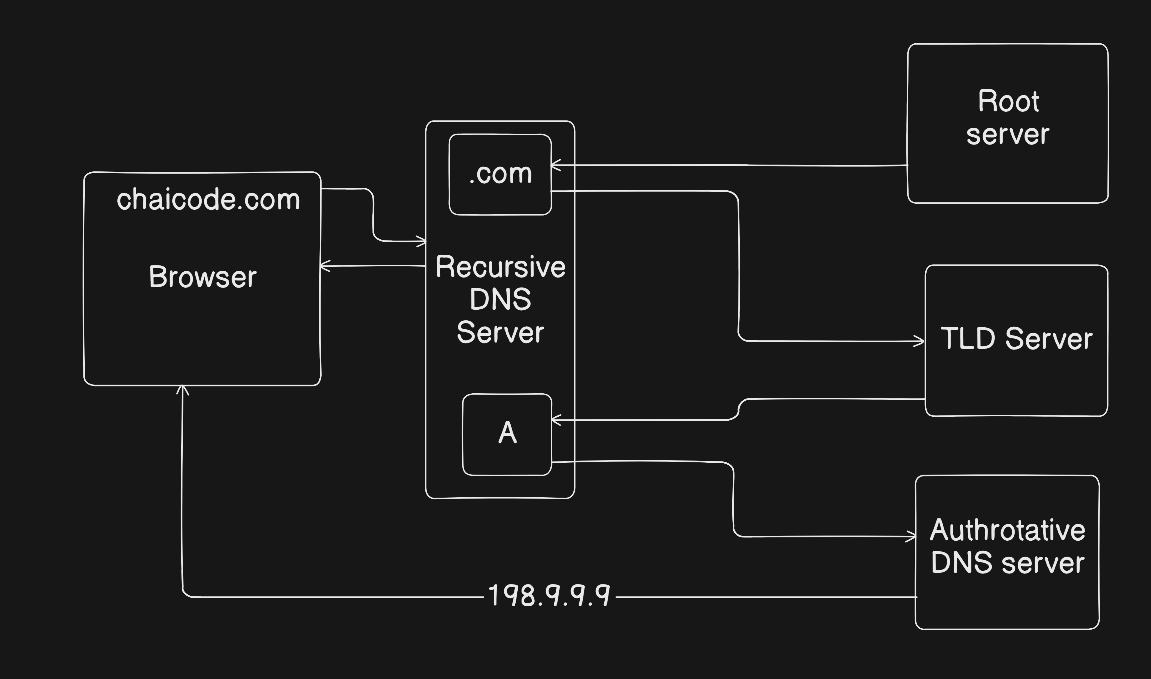
Lets understand how DNS resolution works. When we hit any domain, the call goes to the recursive DNS server. The recursive DNS server first call the root servers. There are 13 root servers and hold the details of who hold the TLD(Top level Domain) servers. TLD are .com, .in, .org so root server knows who handle the TLDs and returns their address. Once the recursive DNS gets the information for the TLDs, it queries TLD. TLDs have the knowledge about the Authoritative DNS servers. Authoritative DNS server is the final source of truth and gives the actual IP address for the domain.
What is the dig command and when it is used?
dig stands for Domain Information Groper. dig command is used for DNS inspection or DNS debugging tool. It is used to debug DNS issues and understand how DNS resolution works. It is also used to verify records after change.
Understanding few dig commands:
dig . NS
. here refers to the root server. As we know there are 13 root servers, so when we use this command, it returns the address of the 13 root servers.
dig com NS
In this command com is used. We know that com is TLD so the dig command will the return the name servers which has the knowledge of .com TLD.
diggoogle.comNS
This command returns the name server which are authoritative for "google.com".
diggoogle.com
In all the above commands we used NS, NS stands for name servers. We could have used record types also in place of NS. To know more about record types, read here. But coming back to this command, if we don't use anything after domain then by default the dig command take default record type as A. A record stands for Address record so this command basically returns the IP address of the google.com.